

Appearance
Late dynamic columns
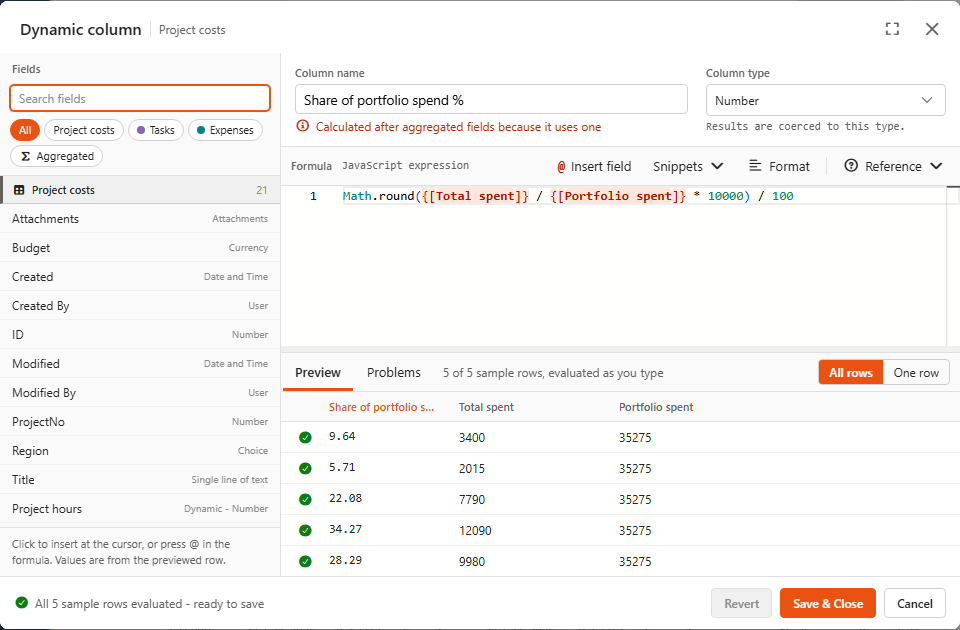
A late dynamic column is a normal dynamic column that uses an aggregated field. It needs the total before it can calculate each row, so Sintel BI calculates it after the aggregated fields. That's why it's called "late".
You don't have to do anything special: use an aggregated field in a dynamic column formula, and the editor shows Calculated after aggregated fields because it uses one under the name.
Typical uses
js
// Share of the total, in %  (demo: Share of portfolio spend %)
Math.round({[Total spent]} / {[Portfolio spent]} * 10000) / 100

// Above or below average
{[Hours]} > {[Average hours]} ? 'Above average' : 'Below average'

// Rank-like bucket against the maximum
{[Amount]} >= {[Max amount]} * 0.8 ? 'Top 20%' : 'Rest'
In each case, the field in the second position (Portfolio spent, Average hours, Max amount) is an aggregated field.
The order of calculation
1. Data is loaded from the list(s)
2. Ordinary dynamic columns          Cost, Total spent, Budget used %, ...
3. Aggregated fields                 Portfolio spent = Sum(Total spent)
4. Late dynamic columns              Share of portfolio spend % = Total spent / Portfolio spent
Aggregated fields and late columns are sorted among themselves by what they use, so an aggregated field can also use a late column, e.g. Sum({[Share of portfolio spend %]}). Loops are blocked.
A late column can't be a merge column
Ordinary dynamic columns are calculated before data sources are merged, so you can join on them. Late columns are calculated last, so you can't.