

Appearance
The demo app
Every example in this guide comes from one small app, Formulas demo. Import it into your own site and you can open each formula, change it and watch the result update.
What's inside
A small project-cost tracker. A PMO tracks project budgets against labour (timesheet tasks) and supplier invoices (expenses).
| SharePoint list | Rows | Columns |
|---|---|---|
FormulasDemoProjects | 5 | Title, ProjectNo, Budget (currency), Region |
FormulasDemoTasks | 20 | Title, ProjectNo, Hours, Rate, Status |
FormulasDemoExpenses | 12 | Title, ProjectNo, Amount (currency), Category, Approved (yes/no), InvoiceDate |
The data includes a few deliberate edge cases:
- Project 4 has no expenses, and project 5 has no tasks.
- One task and one invoice belong to project 99, which doesn't exist.
| Data source | Built on | What it shows |
|---|---|---|
| Tasks | FormulasDemoTasks | Dynamic column Cost, aggregated field Total hours |
| Expenses | FormulasDemoExpenses | Plain data, used as reference data |
| Project costs | FormulasDemoProjects + Tasks and Expenses as Reference only | 11 dynamic columns, 8 aggregated fields, a late dynamic column |
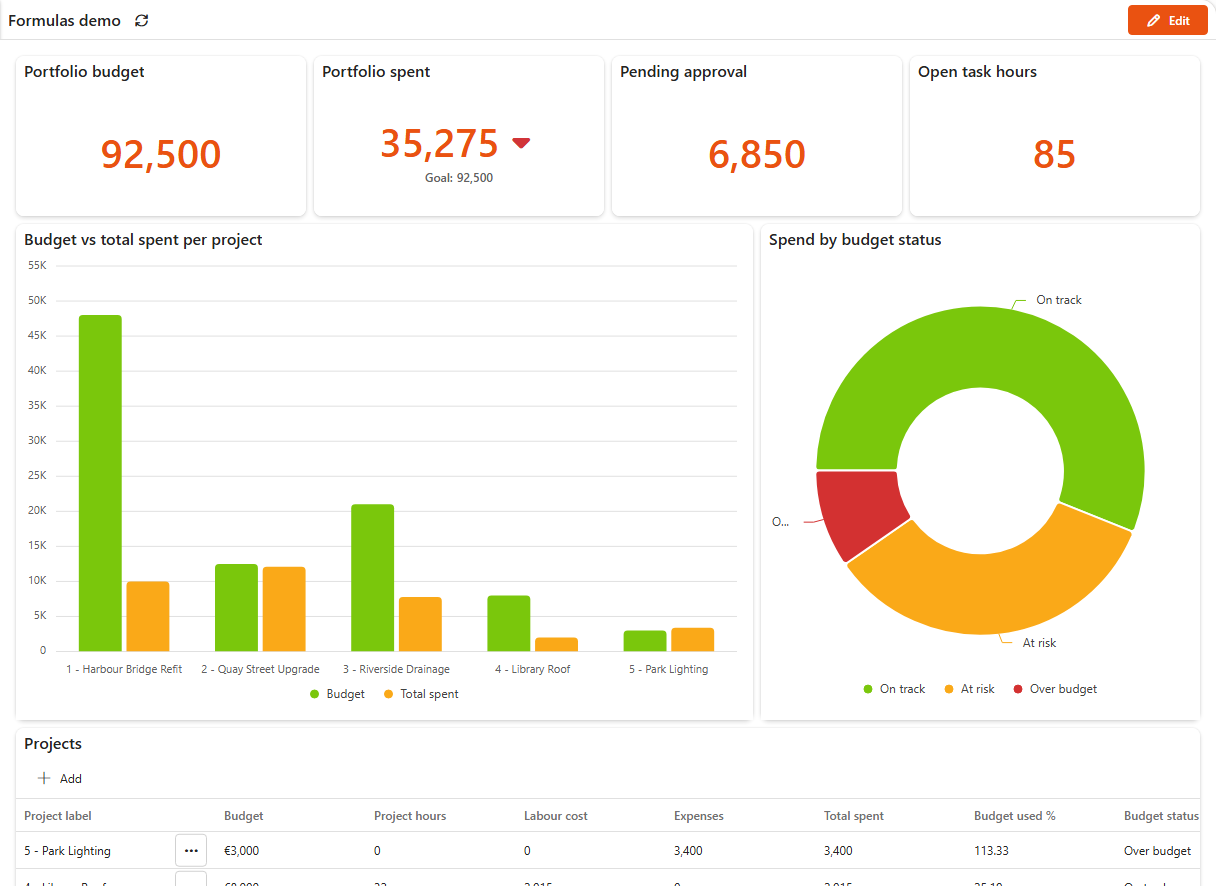
The Formulas demo dashboard shows the results:
- KPI cards with four aggregated fields: portfolio budget, portfolio spent (against the budget as its goal), pending approval and open task hours.
- A column chart of budget against total spent per project.
- A donut of spend per budget status.
- The projects grid with the dynamic columns.
Import it
- Download FormulasDemo.sintelappzip. Sintel Apps must be installed on your site to import the lists and their data.
- In Sintel BI, open Settings > Import/Export and click Import App.
- Pick the downloaded file and click Import in the summary. The import creates the three lists with their data, the three data sources and the dashboard.
- Open Data Sources > Project costs and click any
f(x)icon to see a formula.
Play safely
The demo lists only contain sample data. Change anything you like. To start again, delete the lists and data sources and import the app again.
Expected values
Use these to check your own changes. They're also the values the screenshots show.
| ProjectNo | Project hours | Labour cost | Expenses | Unapproved | Total spent | Last invoice | Budget used % | Budget status | Share of portfolio spend % |
|---|---|---|---|---|---|---|---|---|---|
| 1 | 26 | 1580 | 8400 | 2400 | 9980 | 2026-09-10 | 20.79 | On track | 28.29 |
| 2 | 49 | 3190 | 8900 | 1500 | 12090 | 2026-10-01 | 96.72 | At risk | 34.27 |
| 3 | 36 | 2140 | 5650 | 650 | 7790 | 2026-10-05 | 37.1 | On track | 22.08 |
| 4 | 32 | 2015 | 0 | 0 | 2015 | (empty) | 25.19 | On track | 5.71 |
| 5 | 0 | 0 | 3400 | 2300 | 3400 | 2026-10-12 | 113.33 | Over budget | 9.64 |
| Portfolio budget | Portfolio spent | All expenses | Pending approval | Hardware spend | Open task hours | Projects over budget | Latest invoice |
|---|---|---|---|---|---|---|---|
| 92500 | 35275 | 26500 | 6850 | 16800 | 85 | 1 | 2026-10-12 |