

Appearance
Spline chart
A spline chart shows trends over a period of time. It works like a line chart, except that it joins the data points with a fitted curve instead of straight lines.
Use it for data that benefits from a smooth curve, for example a product life cycle or an impulse response.
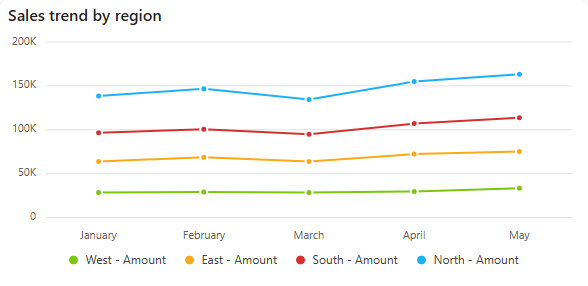
Add a spline chart
- In the designer, open the Charts tab of the Widgets pane and drag Spline Chart onto the dashboard. Resize it as required.
- On the Assign Data tab, pick the Data source.
- Add the number to plot to Values and the time field to Category. Optionally add a field to Series for one curve per group.
- Name the chart and adjust its look on the Properties tab, then save the dashboard.
Every setting is described in Common chart settings.
Fill the area under the curve
A spline area chart draws the same curve and fills the area below it.