

Appearance
Snippets
Where to type it
Data Sources > open the data source > + Dynamic column at the bottom of its field list. The formula editor opens, with Snippets in its toolbar. See The formula editor.
Snippets in the formula toolbar inserts a ready-made formula at the cursor. Snippets use placeholder field names such as {[Value]} or {[StartDate]}, so after inserting one, replace each placeholder with a real field: select the placeholder token, then click the field in the Fields list.
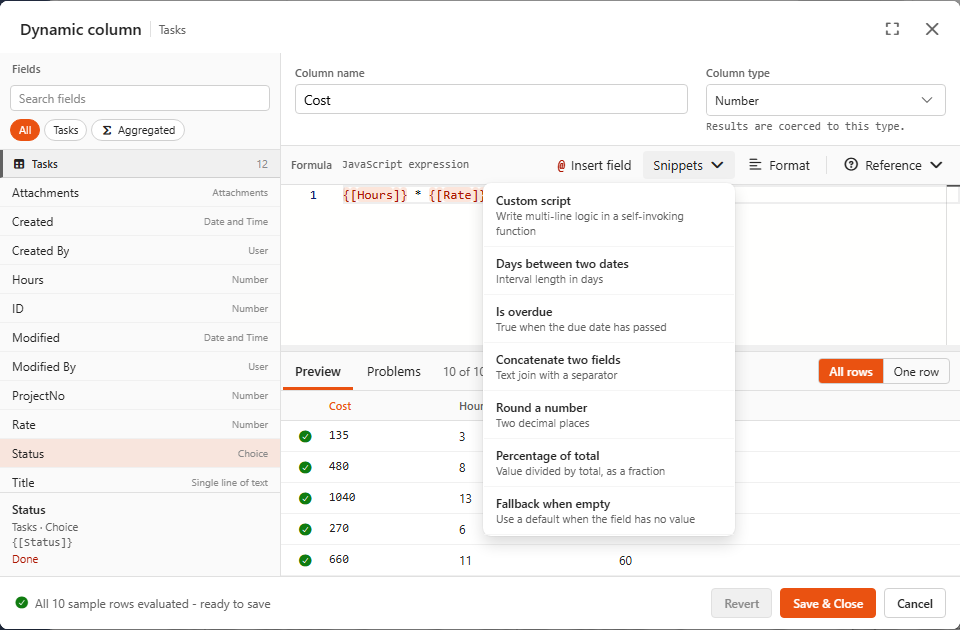
Dynamic columns and aggregated fields have different snippet lists. The aggregated ones are on Helpers.
Dynamic column snippets
Custom script
Write multi-line logic in a self-invoking function.
js
(() => {
    const value = {[Value]};
    return value;
})()
Use it when a formula needs intermediate values or if statements. Everything between the braces can be several lines, and return gives the result. Example with demo fields:
js
(() => {
    const left = {[Budget]} - {[Total spent]};
    if (left < 0) return 'Over by ' + Math.abs(left);
    return 'Left: ' + left;
})()
Days between two dates
Interval length in days.
js
Interval.fromDateTimes(DateTime.fromISO({[StartDate]}), DateTime.fromISO({[EndDate]})).length('days')Replace StartDate and EndDate with your date fields and set the type to Number. Wrap the formula in Math.floor(...) for whole days. If either date is empty the formula fails for that row, so guard it when that can happen: {[EndDate]} ? Interval... : null.
If the end date is before the start date, the interval is invalid and the row gets no value. For days counted from today, use Days overdue.
Days overdue
Whole days since the due date, like Excel's =TODAY()-A2. Not built into the Snippets menu: copy it from here.
js
{[DueDate]} ? Math.max(0, Math.floor(DateTime.now().diff(DateTime.fromISO({[DueDate]}), 'days').days)) : nullReplace DueDate with your date field and set the type to Number. An empty due date gives an empty value, and a due date in the future gives 0. Leave out Math.max(0, ...) if you want negative numbers for due dates in the future.
Is overdue
True when the due date has passed.
js
DateTime.fromISO({[DueDate]}) < DateTime.now()Set the type to Yes/No. It's calculated when the data loads, so it's always relative to "now".
Concatenate two fields
Text join with a separator.
js
{[FirstName]} + ' ' + {[LastName]}The demo uses the template form to build Project label: `${{[ProjectNo]}} - ${{[Title]}}`.
Round a number
Two decimal places.
js
Math.round({[Value]} * 100) / 100Change 100 to 10 for one decimal or 1000 for three. The demo's Budget used % combines a calculation and rounding: Math.round({[Total spent]} / {[Budget]} * 10000) / 100.
Percentage of total
Value divided by total, as a fraction.
js
{[Value]} / {[Total]}Returns a fraction (0.25 = 25%); multiply by 100 for a percentage. To divide by the total of all rows, make Total an aggregated field. The column then becomes a late dynamic column, like the demo's Share of portfolio spend %.
Fallback when empty
Use a default when the field has no value.
js
{[Field]} ?? 'N/A'?? only replaces null and missing values, so 0 and empty text are kept. Use || if you also want to replace 0 and ''.
Suggesting a snippet
The snippet list is built into Sintel BI, so you can't add your own to it. To suggest a new snippet, email info@sintelapps.com.