

Appearance
The Rows helper
Rows is a small set of functions for working with lists of rows, above all the reference data of a Reference only child. It does the common jobs (look up, filter, count, total) quickly, because it builds an index of the reference data once and reuses it for every row.
The functions
| Function | Returns |
|---|---|
Rows.find(rows, field, value) | the first row whose field equals value, or null |
Rows.filter(rows, field, value) | all rows whose field equals value (an empty list if none) |
Rows.count(rows, field, value) | how many rows have field equal to value |
Rows.sum(rows, field) | total of field over rows (0 if none) |
Rows.avg(rows, field) / Rows.min / Rows.max | average / smallest / largest of field, or null if there are no numbers |
rowsis usually{[Child_MergedData_]}, or the result of anotherRows.filter.fieldis a field's internal name in quotes:'ProjectNo'. A path like'Author.id'also works.valueis what to match, usually a field of the current row:{[ProjectNo]}.
Why it's faster
A dynamic column's formula runs once per parent row. Written with plain .filter(...), each run looks through every child row:
| Parent rows × child rows | Plain .filter / SumIf | Rows |
|---|---|---|
| 5 × 20 (the demo) | instant | instant |
| 500 × 2 000 | 1 000 000 checks, noticeable | ~2 500 lookups |
| 5 000 × 5 000 | 25 000 000 checks, about 1-2 s per column | ~10 000 lookups |
Rows.filter(ref, 'ProjectNo', 3) builds an index of the reference rows by ProjectNo the first time it's called. Every later call, for any project, is a direct lookup. Results like Rows.sum(Rows.filter(...), 'Hours') are also remembered per project, so repeated combinations cost nothing.
Rule of thumb
For any formula that matches parent rows to child rows by a key, use Rows.filter / Rows.find. Keep plain JavaScript (.filter(r => ...)) for conditions that aren't a simple "field equals value", and apply it to a list already narrowed by Rows.filter.
Recipes
js
// Lookup with a fallback when the key is missing
{[Hours]} * (Rows.find({[Rates_MergedData_]}, 'Category', {[Category]})?.Rate ?? 0)

// Does the key exist in the reference data?
Rows.count({[Rates_MergedData_]}, 'Category', {[Category]}) > 0

// Total of the child rows for this row's key (demo: Project hours)
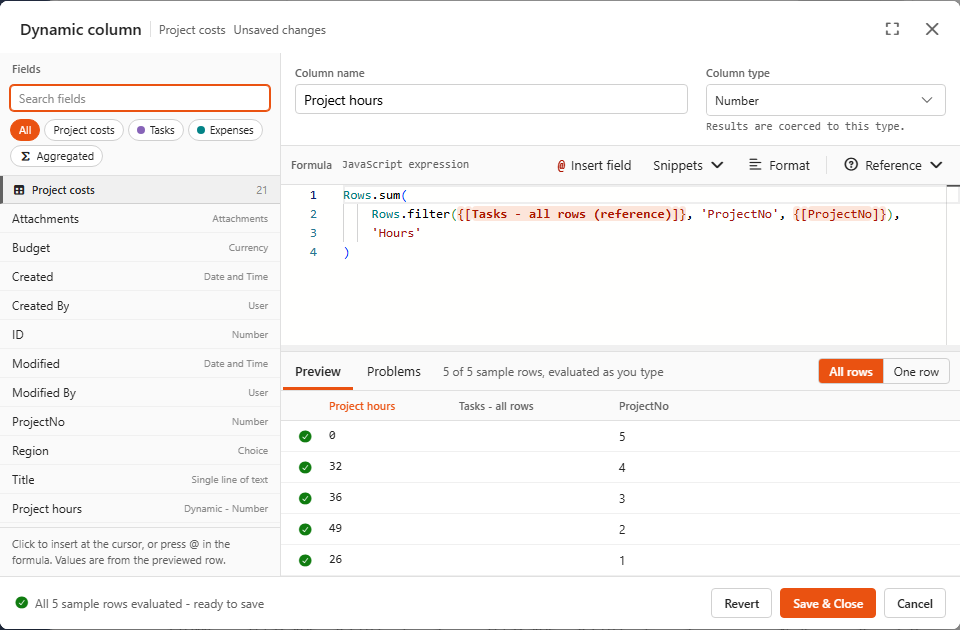
Rows.sum(Rows.filter({[Tasks_MergedData_]}, 'ProjectNo', {[ProjectNo]}), 'Hours')

// Two conditions: filter twice (demo: Unapproved expenses)
Rows.sum(Rows.filter(Rows.filter({[Expenses_MergedData_]}, 'ProjectNo', {[ProjectNo]}), 'Approved', false), 'Amount')

// Share of the reference total
(Rows.find({[Rates_MergedData_]}, 'Category', {[Category]})?.Rate ?? 0) / Rows.sum({[Rates_MergedData_]}, 'Rate')

// Custom condition: narrow with the index first, then use a function on the small group
[...Rows.filter({[Rates_MergedData_]}, 'Category', {[Category]})]
    .filter((rate) => rate.ValidFrom <= {[Date]})
    .sort((a, b) => b.ValidFrom.localeCompare(a.ValidFrom))[0]?.Rate ?? null

// Largest single invoice of this project
Rows.max(Rows.filter({[Expenses_MergedData_]}, 'ProjectNo', {[ProjectNo]}), 'Amount')(Rates stands for any lookup table connected as Reference only, e.g. hourly rates per category.)
Match on a SharePoint lookup column
Often the child list points to the parent with a lookup column instead of a key like ProjectNo. Say the Tasks list has a lookup column Project to the Projects list. In each task row:
'Project'is the value the lookup shows (usually the project's title), as text,'Project_RawLookupValue.lookupId'is the ID of the project item, as a number.
js
// Match on the item ID: safe even when two projects have the same title
Rows.sum(Rows.filter({[Tasks_MergedData_]}, 'Project_RawLookupValue.lookupId', {[ID]}), 'Hours')

// Match on the shown value
Rows.count({[Tasks_MergedData_]}, 'Project', {[Title]})

// Lookup that allows multiple values: 'Project' is a list, so use plain JavaScript
{[Tasks_MergedData_]}.filter((task) => (task.Project ?? []).includes({[Title]})).length
The parent data source needs the ID field for the first recipe. Use the lookup column's internal name if it differs from its display name.
Gotchas
| Symptom | Cause | Fix |
|---|---|---|
Always 0 / null, although matching rows exist | Types differ: 1 (number) doesn't match "1" (text) | Convert the row's value: Rows.filter(ref, 'ProjectId', String({[ID]})) |
Rows.max over dates returns null | sum/avg/min/max only count numbers. Dates and numbers stored as text are skipped | For dates use Max(Rows.filter(...).map((r) => r.Date)), or write a reduce |
sort is not a function / "read only" error | Results from reference data are locked | Copy first: [...Rows.filter(...)].sort(...) |
| Nothing matches an empty key | null and missing values never match, on purpose | Handle empty keys separately: {[ProjectNo]} == null ? 0 : Rows.sum(...) |
Why there's no Rows.find(rows, row => ...)
The speed comes from indexing on "field equals value". A free-form function can't be indexed or reused between rows, so it would be no faster than plain .find. Narrow with Rows.filter first, then apply your function to the small group.
Rows also works elsewhere
Rows works on any list of rows: reference data, the raw rows of a regular join (Include raw data), or plain lists inside a formula. The index and caching are only used for reference data, which is locked and shared. For other lists it simply does the work directly.