

Appearance
Troubleshooting
Start with the editor's Problems tab and the One row view: it shows the formula with the row's actual values filled in, which explains most surprises.
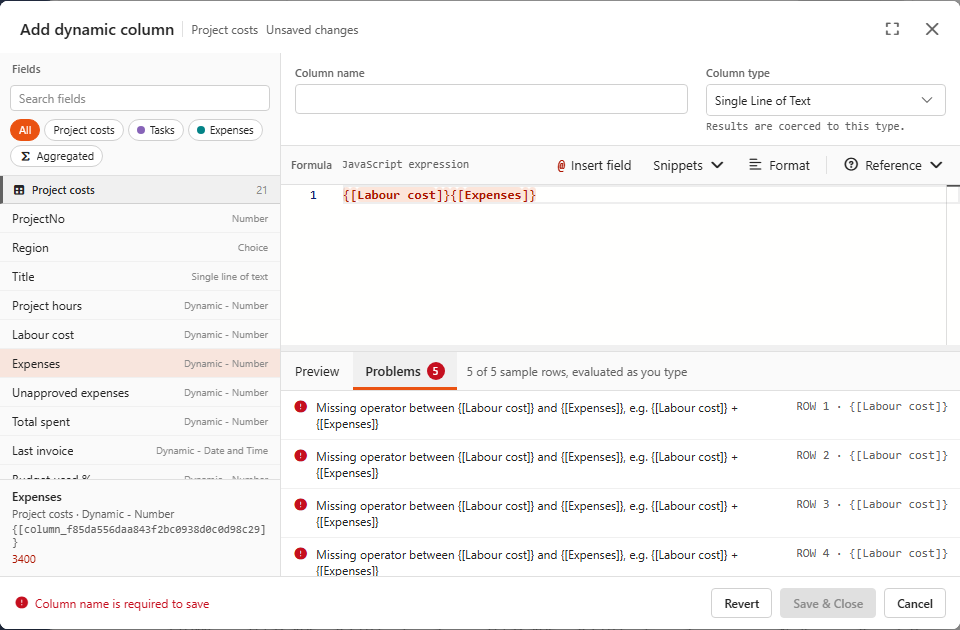
Error messages
| Message | Usual cause | Fix |
|---|---|---|
Missing operator between {[A]} and {[B]} | Two fields next to each other, e.g. clicked one after the other in the Fields list | Put an operator or comma between them: {[A]} + {[B]} |
Unexpected field, an operator or comma is probably missing before it | A value right before a field, e.g. 5 {[A]} | Add the missing operator: 5 * {[A]} |
Unexpected token / missing ) after argument list | Unbalanced brackets or quotes | Use Format, or check that every (, [, { and ' is closed |
... is not defined | A misspelt function or variable (sum instead of Sum, row.Hours outside a function) | Check the spelling. Names are case-sensitive |
Cannot read properties of null (reading 'x') | A value is empty: a missing lookup, an empty date | Use ?. and ??: Rows.find(...)?.Rate ?? 0 |
Invalid DateTime / empty date result | DateTime.fromISO received an empty value or a non-ISO text | Guard it: {[Date]} ? DateTime.fromISO({[Date]}) : null |
Cannot assign to read only property / sort fails | Sorting or changing reference data | Copy first: [...{[Tasks_MergedData_]}].sort(...) |
Circular reference detected | Fields that use each other in a loop | Break the loop. The dialog won't save a field that refers to itself |
| Warning: field not found | A token for a field that was renamed or deleted, or a snippet placeholder like {[Value]} | Replace the token by clicking the right field |
Wrong results without an error
| Symptom | Cause | Fix |
|---|---|---|
| Result is 0 or empty although matching child rows exist | Key types differ: number 1 vs text "1" | Rows.filter(ref, 'ProjectNo', Number({[ProjectNo]})) or String(...) |
Sum gives 0 / too little | Numbers stored as text are skipped | Sum({[Amount]}.map(Number)) |
| Aggregated value differs between the editor and the dashboard | The editor uses the top 10 preview rows | Switch on Disable data preview limit in the designer, see Preview uses sample rows |
| KPI doesn't change when a dashboard filter is applied | Aggregated fields are calculated before dashboard filters, by design | Filter in the data source, or put the condition in the formula with SumIf |
| Conditional total looks random | SumIf given lists from different sources ({[Tasks_Hours]} with {[Status]}) | Use lists from the same source: {[Tasks_Hours]} with {[Tasks_Status]} |
| Number shows as text, or doesn't sort numerically | Column type is Single Line of Text | Set the type to Number |
| Child dynamic column is missing in the reference rows | Its property name is internal (column_...), not the display name | Insert it from the expanded All rows (reference) list |
Performance
If a data source with Reference only children loads slowly:
- Replace
.filter(...),.find(...)andSumIfover reference data withRows.filter/Rows.find/Rows.sum(why). - Limit the child data source with a filter or a smaller row limit. It's always loaded in full.
- Avoid sorting a copy of the whole reference list in every row.
Rows.max/Rows.minare calculated once.
Still stuck?
Send the Sintel BI team the formula, the column type and a screenshot of the One row view of a failing row.